Moon+ Reader Pro
Moon+Books & Reference
4.212.66K Reviews
- Version
- 10.7
- Installs
- 1.00M
- Age Rating
- Everyone
Screenshots


Our Review of Moon+ Reader Pro
 Analysis by Appyee
I tend to judge an ebook reader by what happens after the first few minutes: can I get a book open, make the page comfortable, and return to it tomorrow without fuss? Moon+ Reader Pro is aimed at people who want that routine to be adjustable rather than locked into one publisher’s preferred layout. It is a paid reading app from Moon+ in the Books & Reference category, and its appeal is clearest when you already have digital books or documents and want more control over how they look on your device.
That freedom has a trade-off. A reader with lots of controls can feel less effortless than a simple store-linked app, especially before you have settled on your preferred settings. I would choose it for a personal library and a reading setup I can tune; I would not choose it just to browse a retailer’s catalogue or to get the most stripped-down possible interface.
Building a comfortable reading routine
Before changing anything, I’d give myself a few ordinary reading sessions to notice what actually gets in the way: glare, crowded lines, or losing a useful passage. That makes it easier to build a routine around real habits rather than turning setup into a project. I’d also keep one familiar book as a test case, so later adjustments are easy to compare.
From opening a book to settling in
Upon downloading Moon+ Reader Pro, I was immediately struck by its sleek and user-friendly interface. Setting it up was a breeze, and I appreciated that the app didn’t bombard me with unnecessary pop-ups or ads right out of the gate. The design feels intuitive, allowing you to dive straight into your reading without fuss.
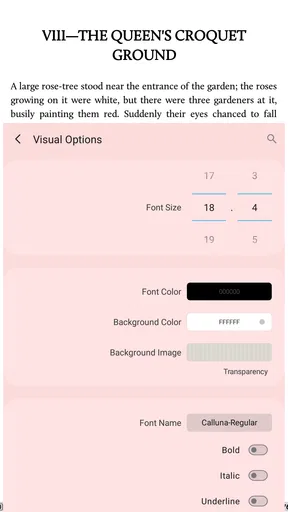
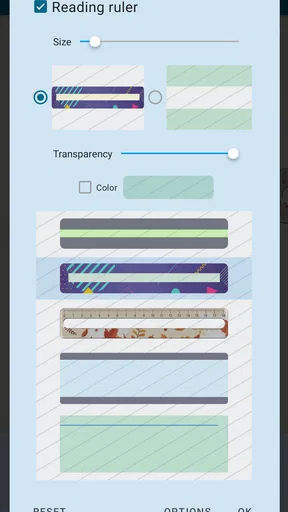
One of the first things I noticed was the vast array of customization options. Whether you're a fan of day mode, night mode, or anything in between, this app has got you covered. You can tweak the brightness, font style, and even the background color to suit your reading preferences. It’s like having a personal reading nook right on your device!
For a first session, I recommend resisting the urge to change everything at once. Open one book you know well, read a few pages, and adjust only the settings that are actually distracting you. A slightly larger type size or softer background can make an immediate difference; changing spacing, margins, and font together makes it harder to tell which adjustment helped. Once a page feels comfortable, keep that setup as your baseline and experiment later if a particular book needs different treatment.
A practical question is whether this is a good fit for someone starting with no ebook collection. It can still serve as a reader, but the experience is more compelling when you bring files you already own or have obtained from a source you trust. If your main goal is to find and buy books in one polished shop, a retailer’s own reading app is usually the more direct route. Moon+ Reader Pro is better thought of as a flexible place to read compatible material than as a complete book-buying destination.
Settings worth taking time to check
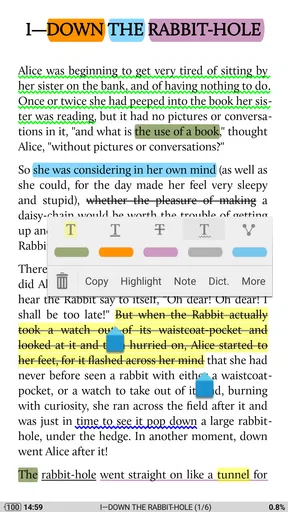
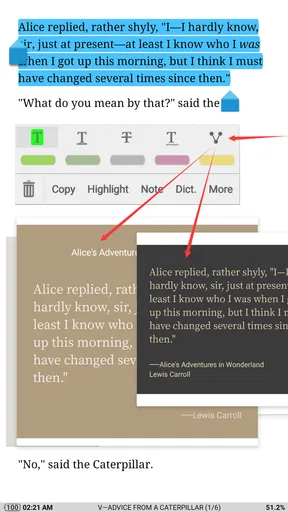
Now, let’s talk features because this app is packed with them. One of the things I love most is the ability to annotate directly on the text. Highlighting, underlining, and adding notes has never been easier. For those of us who love to mark up our books, this is a dream come true.
Annotations are most useful when they have a purpose. I use highlights for passages I may want to revisit and notes for questions or connections that would otherwise vanish from memory. In a study session, that distinction keeps the page from turning into a wall of colored marks. Before committing to a long book, try adding a note, leaving the book, and returning to it; that small test tells you whether the annotation workflow feels natural enough for your needs.
Another standout feature is the app’s integration with online libraries. You can easily access massive collections of free books, making it perfect for anyone looking to expand their reading list without breaking the bank. Plus, if you’re into audiobooks, you’ll be thrilled to know that Moon+ Reader Pro supports them too, which is perfect for multitasking.
The online-library angle is handy for exploring public-domain reading, but I would treat it as a discovery route rather than assume every title I want will be there. I also find it helpful to keep the distinction clear between a library source and the reading app: availability and catalog organization depend on the source, while Moon+ Reader Pro is where I manage the reading experience. If a specific book matters, check that you can obtain it in a format the app handles before building your whole routine around it.
Small adjustments that make reading easier
One of the most impressive aspects of this app is its focus on personalization. You can adjust almost every aspect of the reading experience to fit your needs. From line spacing and margins to text alignment and paragraph spacing, the customization options are endless.
Those controls are not just decoration. A narrow screen may feel less tiring with shorter lines, while a document with dense paragraphs can become easier to follow when spacing is opened up. The best choice depends on the book and the device, so I would avoid treating one layout as universally ideal. When a page feels crowded, try changing one variable at a time and read a full page before deciding whether the change works.
For those who need a little extra help reading, the app’s accessibility features are a huge plus. You can adjust the text size and font to accommodate visual impairments, making it an inclusive option for all readers.
For everyday use, that flexibility can matter more than a dramatic feature. Imagine reading a few pages on a bright commute, then picking up the same book at home when the room is dim. A comfortable brightness and a clear text size reduce the need to strain or constantly reposition the device. If you rely on a particular font or layout for legibility, spend a little time checking that a book remains readable after you move between formats; PDFs, for example, do not behave like reflowable ebooks, so a layout adjustment may not affect them in the same way.
Keeping a library manageable across devices
Moon+ Reader Pro also excels in keeping your reading experience seamless across devices. With the ability to sync your books and progress via Dropbox or Google Drive, you can switch from your phone to your tablet without losing your spot. It’s perfect for those of us who like to read on the go.
Cloud syncing is most valuable when you make it part of a deliberate routine. I would decide which device is the main home for a book, then test a short reading session on a second device before depending on synchronization during a busy week. That helps catch mismatched files or a progress position that has not updated as expected. Syncing is convenient, but it is not a substitute for keeping your original ebook files organized somewhere you can find them.
The app supports a wide range of file formats, including EPUB, PDF, MOBI, and more. This versatility means you can bring your entire digital library into one convenient location.
There is a useful distinction between having many formats in one library and having every file behave identically. A flowing ebook is generally easier to restyle than a fixed-page document, so I would use EPUB for a novel when that option is available and keep a PDF for material whose page layout matters. That choice can save time: instead of wrestling with a document that was designed to preserve a printed page, use the format that best suits the way you want to read it.
Performance, shortcuts, and sensible limits
In terms of performance, Moon+ Reader Pro is buttery smooth. I haven’t experienced any lag or glitches, which is a relief because nothing ruins a good reading session like a buggy app. The page-turning animation is fluid, and the text rendering is crisp, ensuring a pleasant reading experience.
Experienced readers can make the app feel faster by settling on repeatable habits instead of continually tweaking. I keep a familiar reading setup for ordinary books, use annotations only when I have a reason to return to a passage, and reserve more involved adjustments for material that genuinely needs them. This avoids spending more time arranging a page than reading it. A good shortcut is simply knowing which two or three controls solve your usual problems, rather than exploring every option each time you open a new title.
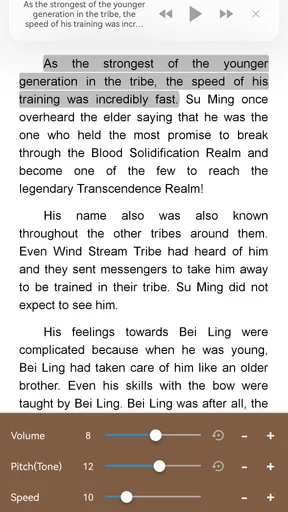
The app also offers a unique "shake to speak" feature, allowing you to have your book read aloud just by giving your device a little shake. It’s a nifty feature for when your eyes need a break but your brain still craves the story.
That can be useful while doing a quiet, hands-busy task, but I would not treat it as a full replacement for a dedicated audiobook service. Text-to-speech and professionally narrated audio are different listening experiences, and the one that works better depends on the book and your situation. If you try shake-to-speak, do it somewhere you can comfortably pause or stop playback; the gesture is convenient only if it fits the way you hold and use your device.
There are limits to the all-in-one approach. A highly adjustable reader asks you to make choices that simpler apps make on your behalf, and that may be needless friction if you only read occasionally. A store-centered app can be better for purchasing and organizing books tied to that store, while a dedicated audiobook app is a more natural choice for listeners who mainly want narrated titles. Moon+ Reader Pro makes the strongest case when your priority is reading files with control over presentation, not keeping every part of a book service under one roof.
Who will get the most from it
In conclusion, Moon+ Reader Pro is a fantastic app for anyone who loves to read digitally. Its vast array of features and customization options make it a standout choice in the world of e-reading apps. Whether you’re a casual reader or a hardcore bibliophile, this app offers something for everyone.
Its audience is more specific than that broad description suggests. I think it suits people who keep books from different sources, annotate while studying, move between a phone and tablet, or want to tune text for comfort. It is less convincing for a reader who expects a curated shop, automatic recommendations, and a completely hands-off setup. If you want to open a book and never think about margins or file types, a simpler reader may leave you happier.
Moon+ Reader Pro is rated 4.2 on average from around 106,000 ratings, with about 13,000 written reviews and over a million installs. The app is rated for Everyone, and its current version is 10.5, with Android 5.0 as the minimum operating system. Those figures suggest a well-established option, though popularity alone cannot decide whether its control-heavy approach suits your habits.
The price is $11.99, so I would think of it as a deliberate purchase rather than a casual download. I would first ask whether I regularly read files from more than one source, use annotations, or care about adjusting the page. If the answer is yes, the flexibility may be worth paying for. If I only read a book now and then through one retailer, that retailer’s included app could be the more economical and convenient choice.
A verdict for readers who like control
If you’re looking for a way to enhance your reading experience, give Moon+ Reader Pro a try. You might just find it’s the perfect companion for your digital bookshelf.
My practical recommendation is to test it with three kinds of material before deciding it has earned a permanent place on your device: a reflowable ebook, a PDF or other fixed-layout document, and a book you want to annotate. That gives you a fair sense of how its customization, file handling, and markup fit your actual reading rather than an idealized setup. If those three tasks feel comfortable, the app can become a dependable everyday reader; if you find yourself fighting the controls, a simpler alternative is a better match.
For me, the central strength is not that every reader needs every option. It is that I can shape a personal reading routine around the books I already have, then repeat it without starting from scratch each time. Moon+ Reader Pro rewards a little setup and sensible habits. Readers who enjoy that kind of control are likely to appreciate it; readers who want a single shop and an invisible interface should look elsewhere.
Verdict
Strengths of Moon+ Reader Pro
- Highly customizable interface.
- Supports numerous file formats.
- Offline reading available.
- Syncs with cloud services.
- Ad-free experience.
Limitations of Moon+ Reader Pro
- Initial setup can be complex.
- No free trial version.
- Limited audiobook features.
- Some features require manual setup.
- Occasional bugs in PDF rendering.
Similar Picks in This Category
View All
Google Play Books & Audiobooks
Google LLC4.7

네이버 - NAVER
NAVER Corp.3.5

Wattpad - Read & Write Stories
Wattpad.com3.7

King James Bible - Verse+Audio
Ozion4.8

Bible Offline-KJV Holy Bible
Bíblia Offline4.9

Amazon Kindle: Reading App
Amazon Mobile LLC4.8
Frequently Asked Questions
What features does Moon+ Reader Pro offer?
Moon+ Reader Pro provides a comprehensive reading experience with features like customizable reading modes, various themes, and text-to-speech. It supports multiple formats including EPUB, PDF, and MOBI. Additionally, it offers cloud syncing, annotation tools, and a built-in dictionary, making it a versatile tool for avid readers.
Is Moon+ Reader Pro compatible with all devices?
Moon+ Reader Pro is designed for Android devices and offers compatibility with most Android smartphones and tablets. While it provides optimal performance on newer models, users should ensure their device meets the app's minimum system requirements for the best experience.
How does cloud syncing work in Moon+ Reader Pro?
Cloud syncing in Moon+ Reader Pro allows users to save their progress, notes, and settings across multiple devices. By linking the app to a cloud service like Google Drive or Dropbox, users can seamlessly switch between devices without losing their reading position or annotations.
Can I customize the reading experience in Moon+ Reader Pro?
Yes, users can extensively customize their reading experience. Options include adjusting font size and style, altering background colors, and setting up night mode. The app also allows users to fine-tune page turning animations and set up gesture controls for a personalized reading style.
Are there any limitations to the formats supported by Moon+ Reader Pro?
Moon+ Reader Pro supports a wide array of formats such as EPUB, PDF, and MOBI, among others. However, DRM-protected files may not be supported. Users should ensure their files are DRM-free to fully utilize the app's capabilities.
